Conveyors and sortation
Organise drives, belts, rollers and sensors beneath the conveyor asset. Connect recurring checks and service jobs to the right component, and keep repeat stoppages in its work history.
TAKE COMMAND OF WAREHOUSE MAINTENANCE
THE OPERATIONAL REALITY
BUILT AROUND THE EQUIPMENT YOU MAINTAIN
Bring conveyors, loading bays, handling equipment and site services into one connected maintenance operation. Give every asset a clear service plan, every defect a record and every job an owner.
Organise drives, belts, rollers and sensors beneath the conveyor asset. Connect recurring checks and service jobs to the right component, and keep repeat stoppages in its work history.
Give each dock leveller, powered door and bay its own location. Record defects precisely, plan service access around vehicle movements and retain repair notes for the next shift.
Keep asset identities, usage readings, inspection findings and service work together for forklifts, pallet trucks and other handling equipment. Route reported defects into accountable follow-up.
Schedule work for wrappers, strappers, compressors and other supporting plant. Record parts used on the job and monitor minimum stock levels for frequently needed spares. Take control of maintenance spares →
ONE CONNECTED MAINTENANCE RECORD
01 / IDENTIFY AND CHECK
A report of ‘the conveyor near despatch’ leaves room for error. Put a printable QR label on each asset so authorised staff can open the correct record. Use repeatable inspections for your approved equipment checks, recording responses, notes and evidence against the job.
Example: an inspection finds a damaged conveyor guard. Record the defect against that conveyor; completing the inspection can create linked corrective work for the maintenance team.
Explore inspections and checklists →02 / PLAN THE SERVICE
Set up planned preventive maintenance for conveyor drives, dock equipment, packing machines and site services. Use calendar, running-hours or operations intervals to suit the asset, with reusable instructions and checklist steps. Plan the resulting jobs around agreed access windows.
Example: a conveyor drive reaches its service interval. Generate the due work, check the parts required and agree a maintenance slot with operations before allocating the engineer.
Explore preventive maintenance →03 / RESPOND AND RECORD
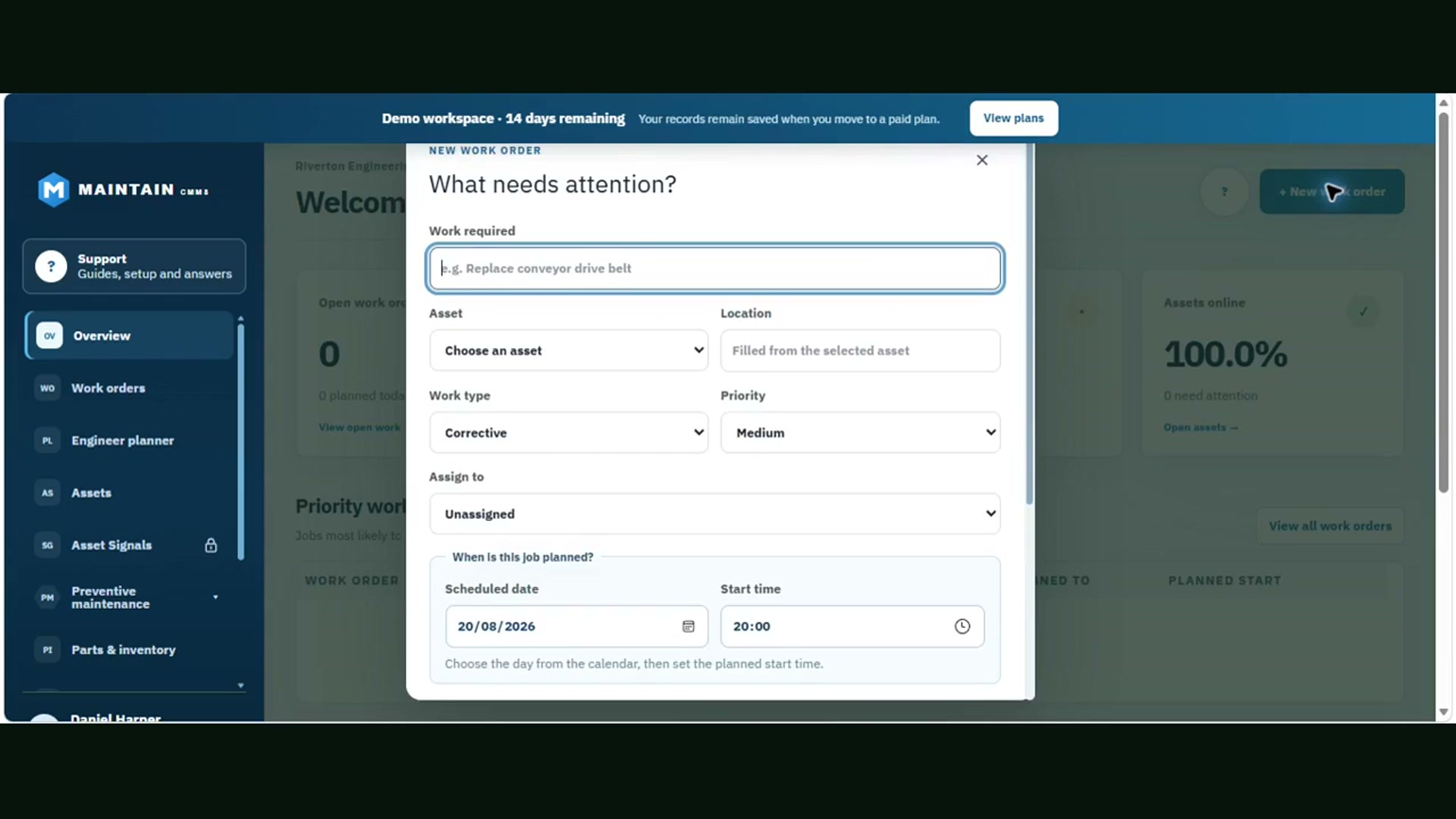
Link a reactive work order to the failed equipment and set a priority that reflects the operational impact. Keep the fault description, repair notes, time, parts and completion evidence with the job so the next shift can see what happened.
Example: a loading-bay door fails during despatch. Record the affected bay and fault, assign the repair and retain the resolution in its history. Review repeated failures before deciding the next maintenance action.
Explore work order management →04 / ALLOCATE THE TEAM
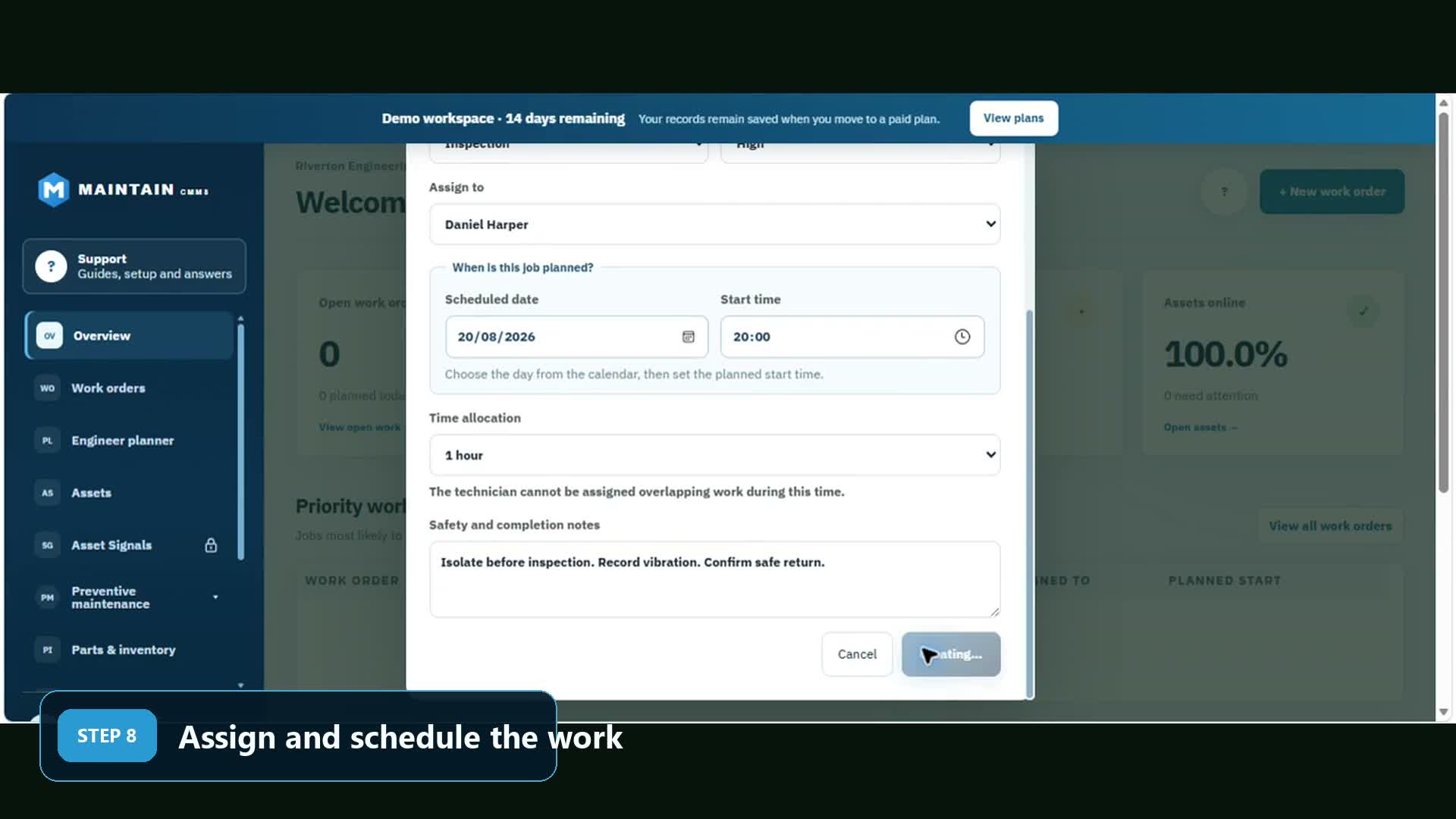
Give each job a named engineer, planned start and expected duration. Use the engineer planner to see commitments and check for overlapping allocations. When a breakdown changes the day, reschedule displaced work explicitly so a planned service does not disappear from the handover.
Example: an engineer is already booked on a dock inspection. Review that commitment before assigning a conveyor repair, then move the inspection to an agreed slot or another available engineer.
Explore maintenance planning →SEE THE PRODUCT
Actual screens from our recorded product walkthrough, using demonstration data. They show the work-order and allocation controls you can use for warehouse jobs. Select an image to view it at full size.
YOUR WAREHOUSE. YOUR TEAM. UNDER CONTROL.
Connect your equipment, PPMs and breakdown jobs. Give engineers a clear schedule and keep the whole operation in view. Start free today.
No card required. Compare plans and included features.
WAREHOUSE CMMS QUESTIONS
Warehouse maintenance software connects equipment records, planned preventive maintenance (PPM), inspections and breakdown jobs. Maintain CMMS gives warehouse and distribution-centre teams one place to identify an asset, assign an engineer and keep the work history, parts and completion evidence together.
A WMS manages stock, picking and fulfilment. A CMMS manages maintenance of the equipment and building services that support those operations. Use Maintain for conveyor servicing, loading-bay defects and engineering work; it does not replace your WMS.
Yes. Printable asset QR labels take authorised users to the relevant equipment record. Link inspection work to that asset, follow the checklist and record the result. Where an inspection records a defect, completing it can create linked corrective work. Scanning a label does not bypass workspace permissions.
Yes. Service plans support calendar, running-hours and operations intervals. Choose the interval and first due point for the asset, then generate due preventive work with its instructions. Asset Signals and configured Flows provide reading-based triggers on eligible plans; equipment readings need to be entered or supplied through a configured source.
Create a work order against the conveyor, set its priority and assign an engineer with a planned start and time allocation. The planner makes assigned work visible and checks for overlapping bookings. Review existing PPM commitments when moving an engineer onto an urgent repair.
Yes. Add handling equipment, dock levellers, powered doors and associated components to the asset register, then attach service plans, inspections and repair jobs. Configure tasks and intervals for your equipment and approved site procedures. These records support your maintenance process; specialist examinations and competent-person decisions remain separate responsibilities.
Basic lets a small team start free. Standard adds unlimited assets, PM plans and spreadsheet imports. Pro adds inspections, parts, Flows, engineer planning and reports. Enterprise covers tailored multi-site and advanced requirements. There are no per-user or per-asset charges.
Start with one area, such as outbound conveyors or loading bays. Import your asset list on a paid plan, check equipment names and locations, add QR labels, and set up the most important PPMs and inspections. Assign a small set of real jobs, review the records with the team, then expand to other areas.
PREMIUM FEATURES WITHOUT THE PREMIUM PRICE
MORE USE CASES
READY TO GET MAINTENANCE UNDER CONTROL?